Record it.
Make it look good.
Screen recorder with multi-take recording, auto-zoom, annotations, captions, and everything you need to ship polished tutorials, lessons, and demos. Mac and Windows.
Free for personal use. No sign-up, no watermark, no limits.
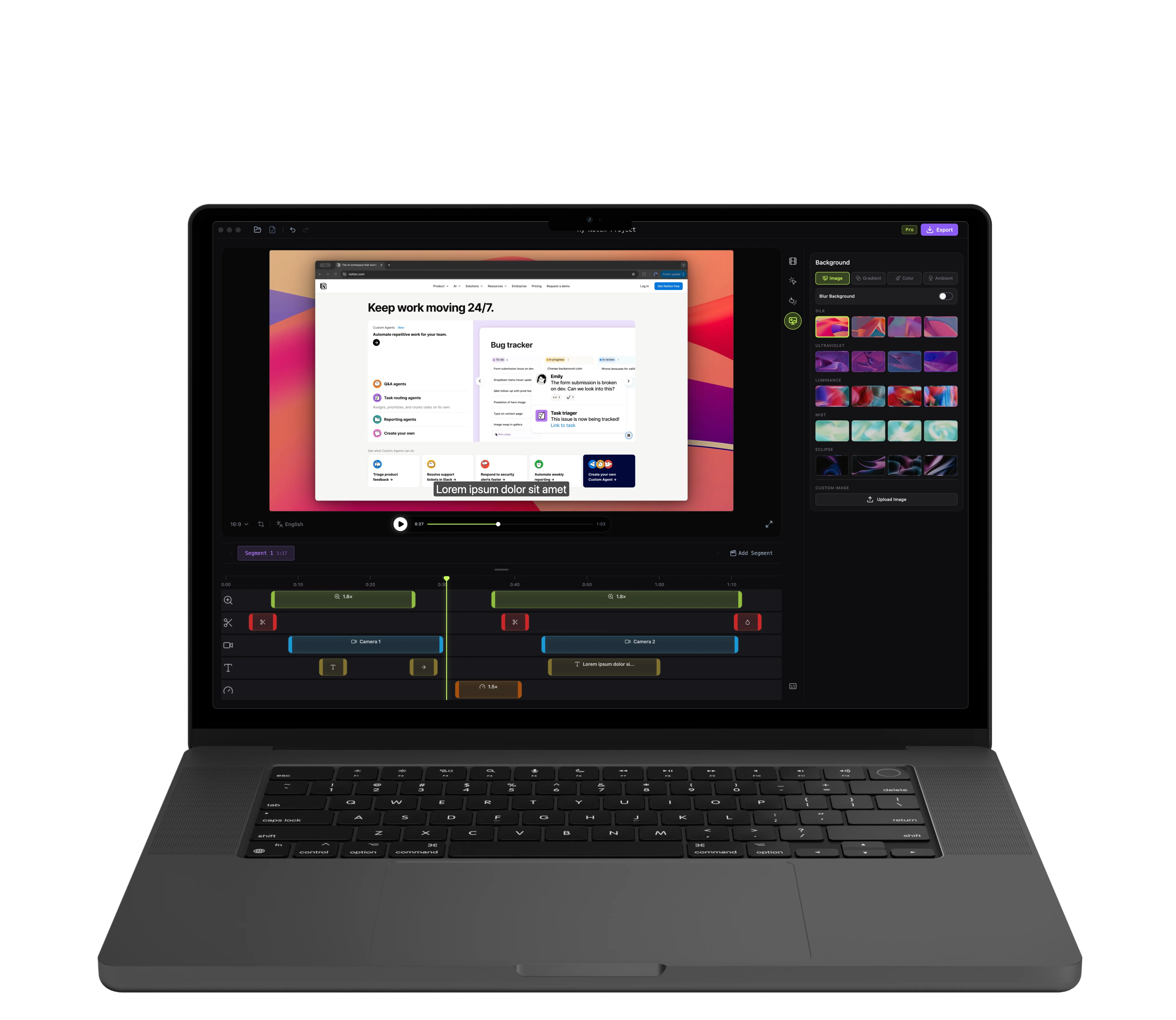
Record + edit in one app
No extra tools needed
Fully offline
Your data stays local
Lifetime license
One-time purchase
Mac & Windows
Native builds
Made for
Record & Zoom
Capture with clarity
Record your screen, mic, system audio, and camera — then let Notch focus the viewer's attention automatically.
Record anywhere
Capture screen or window with mic, system audio, and camera in one fast setup. Countdown, start, done.
Auto-zoom that follows the action
Notch detects where you pause and zooms in automatically. Smooth transitions, zero keyframing.
Animated cursor & clicks
Highlight your cursor, animate every click. Every interaction becomes visible.
Record in parts. Export as one.
No more restarting a 10-minute lesson because of one stumble. Build modules, tutorials, and series the way you actually shoot — in pieces.
Record part by part
Record each part of your content when you're ready. One section at a time, no pressure to get everything perfect in a single take.
Arrange and combine
Reorder parts, remove the ones you don't need, cut out mistakes from any clip. Add smooth transitions between parts and export a single polished video.
Style & Polish
Make it look professional
Clean backgrounds, annotations, and webcam overlay. Turn a raw recording into something you're proud to share.
Templates and backgrounds
50+ gradients, mesh backgrounds, and custom wallpapers. Add shadow, blur, rounded corners, and padding. Save your visual setup as a preset and apply it to any future recording in one click.
Annotations that explain
Text labels, arrows, shapes, and blur zones — with enter/exit animations and precise timing on the timeline.
Webcam on your terms
Show, hide, position, and resize your webcam overlay anywhere on the timeline. 9 positions, custom size, mirror toggle.
Captions & Localization
Speak every language.
Add captions in multiple languages and export the version you need — as burned-in subtitles or an SRT file.
Captions in your language
Add captions to your video in any language and ship a localized version per audience. AI-driven translation through your own LLM is on the roadmap.
Export with subtitles or SRT
Burn captions into the video for a specific language, or export a standalone SRT file. Share the same video with different audiences.
Edit & Export
Fix, finish, ship
Trim the pauses, cut the mistakes, then export as MP4 or GIF.
Cut the dead time
Trim mistakes with blur, darken, or hard-cut transitions. Speed up or slow down any section from 0.25x to 2x.
Export and share
Export as MP4 up to 4K or compact GIF. Choose from H.264, H.265, VP9, and AV1 codecs. Save SRT subtitles alongside the video for YouTube, Vimeo, or your LMS.
Simple pricing
Pay once, use forever. Future updates included.
Personal use is free for hobby, education, open source, and content created without monetization. A Commercial license is required for paid work, business operations, or content that generates revenue.
Personal use
Hobby, education, open source
- ✓All editing features
- ✓Unlimited projects
- ✓Export up to 4K (MP4 & GIF)
- —Your watermark on exports
- —Email support
Commercial use
One-time purchase
- ✓All editing features
- ✓Unlimited projects
- ✓Export up to 4K (MP4 & GIF)
- ✓Your watermark (logo or text)
- ✓Early access to new features
- ✓6 months of priority email support
- ✓Use for paid / commercial work
Questions & answers
Yes. Pay once, use forever. All core features and future updates are included with no recurring fees.
Same app, same features, no project or export limits on either. Personal use is free for hobby, education, open source, and content created without monetization. A Commercial license is required for paid work, business operations, or revenue-generating content — it also unlocks your own logo or text as a watermark on exports, early access to new features, and 6 months of priority email support.
It's built for it. Style presets keep your branding consistent across lessons, the Assets library reuses backgrounds and audio across modules, and multi-take recording lets you build long lessons in pieces. Multilingual captions ship today, with auto-captions arriving in v1.3.
Yes — and that's a core focus. Add captions in any language, export burned-in subtitles or standalone SRT files for each locale. AI-driven caption translation through your own LLM is on the roadmap.
Yes, both. Native builds for macOS (Intel and Apple Silicon) and Windows.
Yes. 720p to 1080p, 15–30 FPS, with loop control. Perfect for documentation, pull requests, and Slack.
No. Download, open, start recording. No sign-up, no email, no friction.
No. Everything stays on your machine. Notch is a fully local desktop app. Your recordings never leave your computer.